How a Hospitality Consulting Firm Saves 3-4 Hours a Day with Excel Automation
[Case Study]

March 15, 2026

8 min read

no comments
Customer profile
Swauger Consulting Services, LLC is an agile hospitality revenue management service based in Maryland, USA, founded and run by Claire Swauger and Harry Swauger.
Swauger Consulting supports over 20 clients in the hospitality industry — including major brands like Best Western, Choice, Hilton, Westmark, and Marriott, as well as management companies like the Kishan Group, Glacier Hotel Group, MSP Hospitality, and others. Swauger Consulting helps their clients optimize performance through accurate forecasting of room occupancy and pricing.
Core services include revenue forecasting, dynamic pricing strategy, and performance analytics. Excel plays a central role in Swauger Consulting's daily operations, serving as the main tool for data analysis and reporting. Customized Excel workflows allow Swauger Consulting to tailor forecasts to each client’s needs, helping hotels make smarter, faster decisions.
Business Goals
As Swauger Consulting’s client base grew, so did the complexity of their Excel workflows.
What prompted us to search for an Excel automation solution in the first place was the growing number of hotels and brands in our service. To scale, we had to streamline our processes.
Each client often represents multiple hotels or brands, and each brings a different type of source data. Since the accuracy of forecasting depends heavily on the quality of source data, preparing data correctly was critical — and increasingly time-consuming.
The primary goal was to streamline and standardize the data preparation workflow.
The objectives included:
- Consolidate fragmented spreadsheets into a single, centralized Forecasting Tool
- Improve accuracy and consistency across reports and forecasts
- Simplify daily reporting for multiple hotels and brands
- Eliminate repetitive copy-paste tasks
Ultimately, Swauger Consulting wanted a solution that would free up valuable time, support business growth, and raise the level of service delivered to clients.
Business Challenges
The process Swauger Consulting had was already somewhat automated — reports could be generated, but the data still needed to be cleaned and organized manually. As the client list grew, this manual work became increasingly unsustainable.
Key challenges included:
- Inconsistent Data Sources
Swauger Consulting uses reports from different property management systems as the source data for forecasting. These reports come in varying formats and templates, so the data required a lot of cleaning and standardization. - Fragmented spreadsheets
There was no centralized spreadsheet to consolidate and analyze the data, making it harder to run consistent analysis and forecasting across clients. - Heavy manual workload
Preparing data required hours of copy-pasting across multiple spreadsheets, increasing the risk of human error.
The more copy and pasting you're doing, the more chances for human error for sure. And if an error would crawl in, I would have to review the whole forecast.
These challenges made it difficult for Swauger Consulting to take on more clients without growing the team.
Previous attempts to outsource spreadsheet automation proved costly and ineffective— an effort that cost over $10,000 but failed to deliver a working solution.
XLTools Implementation
Swauger Consulting turned to XLTools automation services to optimize their Excel-based forecasting system.
The goal was to build a fully automated, centralized spreadsheet that could serve all hotel clients— regardless of brand or source data format — and ensure consistency in data analysis and forecasting.
We started by discussing Swauger Consulting's existing processes, challenges, and goals. We didn't need to be experts in the hospitality industry — but as Excel automation specialists, we focused on understanding how the data needed to flow and how to align the reports with Swauger Consulting's forecasting model.
Process before: heavy with copy-paste operations
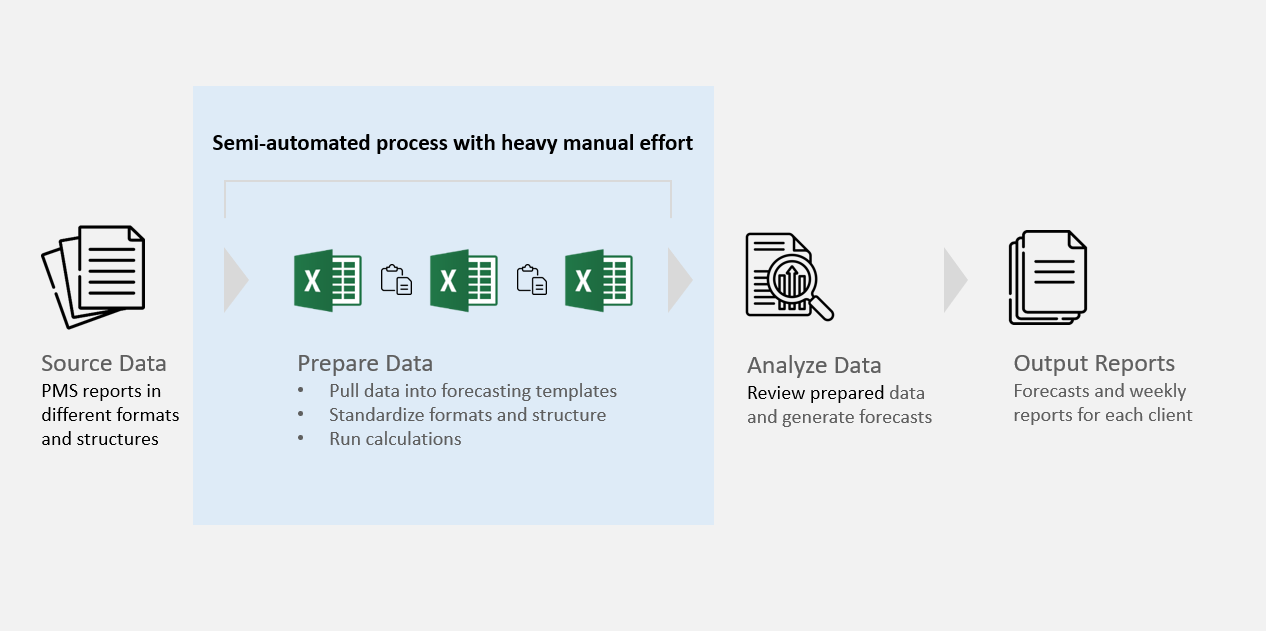
At the time, preparing data for just 10–11 hotels took Swauger Consulting 3–4 hours every day — even before any actual forecasting or analysis work began.
The first phase of automation was completed in about 1.5 weeks. The XLTools team built the initial workflow, tested it, and refined it using data from the first few hotels.
It just changed my day. It was hundreds of copy-paste operations I used to do per day. And now it's almost zero. It saves us 3-4 hours a day easily.
The final solution streamlined the entire data preparation process using XLTools Automation features, custom VBA macros, and Excel formulas. The result: a unified Excel spreadsheet — the Forecasting Master File — tailored to Swauger Consulting's needs. It pulls in data from various sources, consolidates it, and prepares it for analysis.
Process after: fully automated data preparation
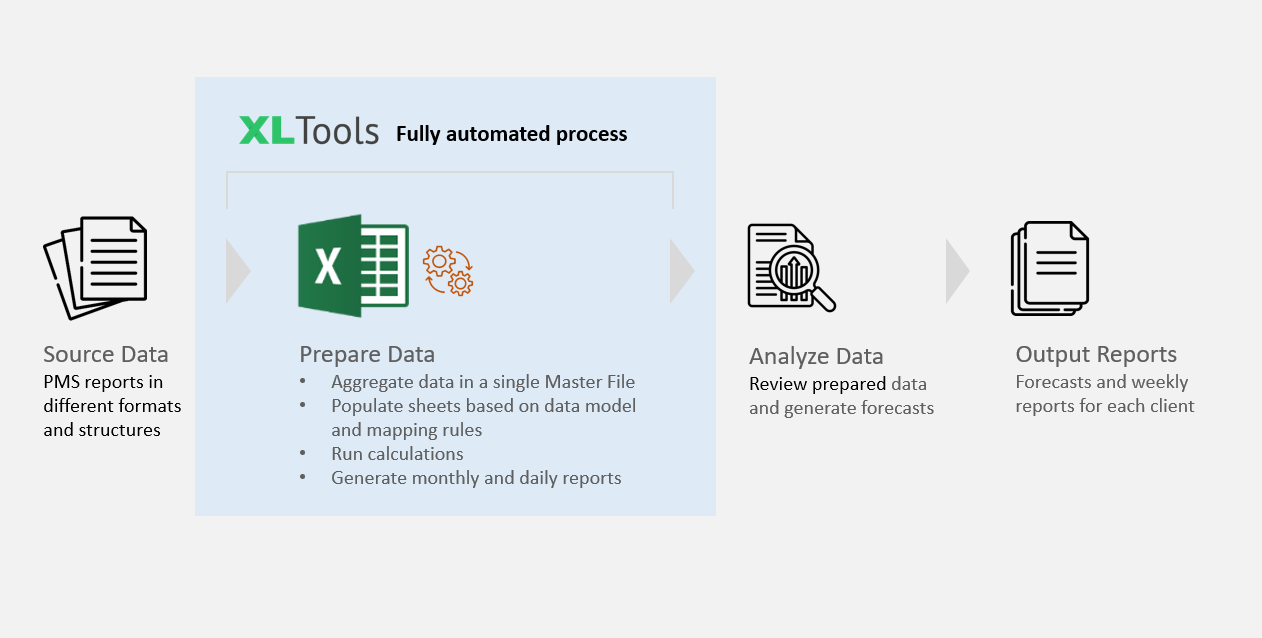
Key features included:
- Automated Data Pulls The routine task of extracting source data and aggregating it into a single file was fully automated.All that’s required is to place the source files — reports from hotel property management systems — into the “Reports” folder located in the same directory as the Forecasting Master File.Regardless of file type (Excel or CSV), report structure, or format, XLTools automatically detects the correct files using keywords in the file names and extracts the necessary data with precision.automated data pull from reports
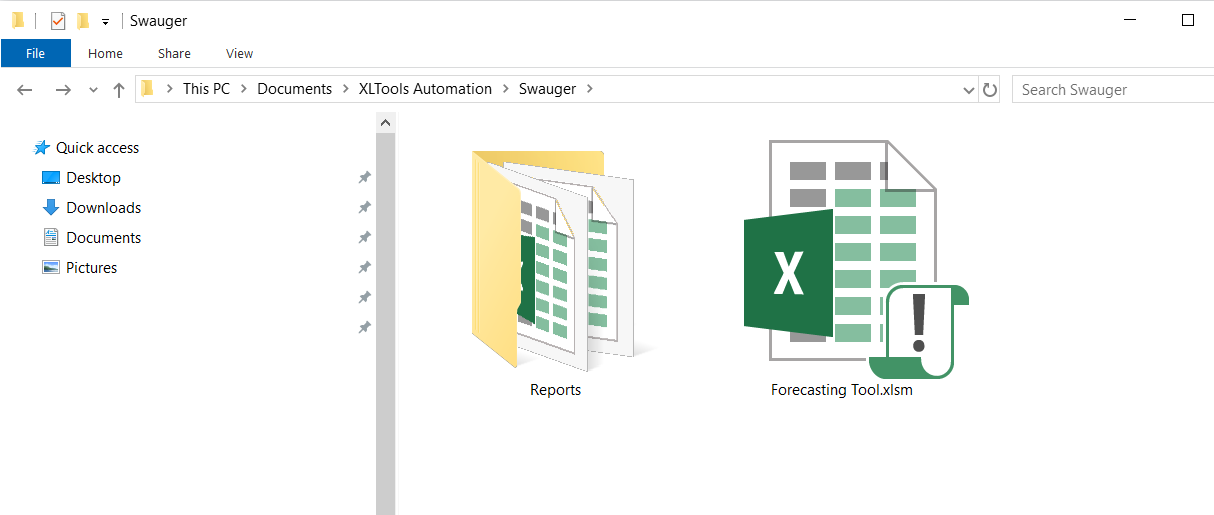
- Unified Master Spreadsheet The unified Forecasting Master File replaced fragmented templates and brought consistency to the forecasting process across all clients. Routine formatting tasks were fully automated. What used to take hours of manual copy-pasting now runs in minutes — sometimes instantly.Key operations are completed with just a click from the XLTools ribbon:Unified Master Spreadsheet
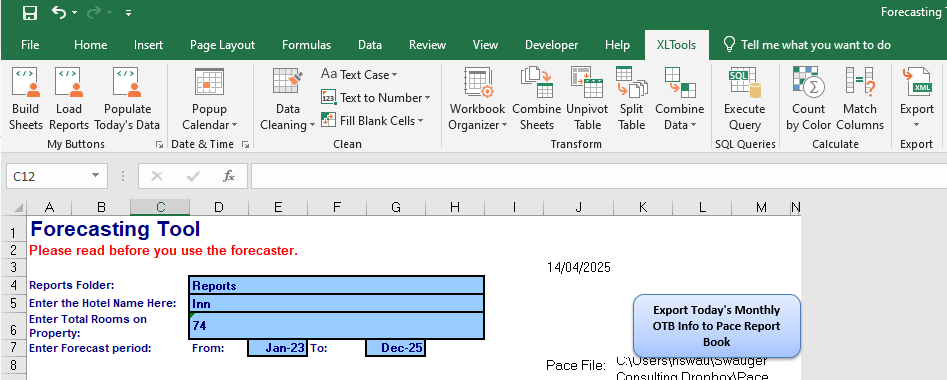
- Step 1. Build Sheets. Generates a sheet for each month in the required forecasting period. Each sheet follows a predefined, consistent template with necessary formulas.
- Step 2. Load Reports. Creates a data model and a set of mapping rules based on the type of the source files.
- Step 3. Populate Today’s Data. Populates the sheets with data from the source reports, using the defined mapping rules. Once new source data is available, the file can be updated instantly with one click.
- Insights to Retrospective Data The XLTools team expanded the logic behind how monthly prices are filled in. A custom VBA script was developed that can run across any date range — both forward and backward — allowing historical and future data to be analyzed together in one place.
I find myself looking for past data a lot. What we were doing before was pulling past data, adding it manually and then we had a little automation only moving forward. Now I can throw in past data AND forward data and then it's all right there for us.
Claire Swauger - Client-Ready Daily Reports Each day, Swauger Consulting sends its clients a brief update — a smaller section pulled from the larger Forecasting Master File. Previously, this required manual preparation. Now, the daily report is generated automatically.
We needed one section of the bigger spreadsheet that we could just email every day. Now we don't have to copy paste it and can send clients better information without extra manual prep and my clients are happier.
Claire Swauger
Results
The custom automation solution implemented by the XLTools team had a transformative impact on Swauger Consulting's day-to-day operations. By removing technical bottlenecks and streamlining workflows, the team — Claire, Harry and one assistant — are now able to support a growing number of clients with ease.
This has been a total game changer. We've got more clients on the way. With a new client, we just feed the data, and it all gets done automatically. Automation with XLTools allowed us to grow. It's very exciting.
The automation delivered immediate and measurable results:
- Time SavingsDaily data preparation time was cut by 3-4 times. Now, it takes just 10 minutes per hotel to pull data and run reports — enabling Swauger Consulting to scale operations without increasing the workload.
- Error Reduction and Data IntegrityAutomation minimized the risk of human error and improved data accuracy, eliminating the need for time-consuming forecast corrections.
- Improved Service LevelWith faster, more accurate insights and less time spent on manual prep, Swauger Consulting is able to focus more on analysis and client needs — leading to better results and happier customers.
Next Steps
Swauger Consulting is planning to continue expanding its client base — and with that growth, the need for further automation will increase as they plan to introduce new services for hotels.
Looking ahead, Swauger Consulting's strategic goal is to launch a client portal or web-based dashboard. This will allow clients to access forecasts, insights and reports online— offering a more modern, scalable, and self-service experience.
The professionalism of the XLTools team was really refreshing, and I appreciate that very much. We'd share an idea, get a quick estimate, and it was done in a couple of weeks. We're confident that when we want to grow and do more, we've already got great people in place.
Reach out to XLTools Team
Is manual Excel work slowing down your business? Let XLTools streamline your workflows and help you grow — with a custom automation solution!
From data transformation to report generation, we help you save time, reduce errors, and focus on what matters most.
👉 Book your free consultation and discover how we can optimize your Excel processes.
Credits to: Claire Swauger and Harry Swauger, Swauger Consulting Services, LLC, Maryland, USA.
Features in focus: Automation without VBA (custom workflows for data preparation and reporting), plus custom VBA and Excel formulas.
Automate Excel No VBA Prepare data Case study
Any questions or comments?
Related articles:
![Excel automation for a printing company [Case Study] | Excel Productivity Blog](/static/30baffa6de45e5360b254e8c7ab5d8f2/blog-excel-automation-for-a-printing-company.png)
How-to
Transitioning from VSTO and VBA to Web Add-Ins and JavaScript
December 11, 2024

7 min read
Case
Excel automation for a printing company [Case Study] | Excel Productivity BlogDecember 20, 2017
12 min read