Use the power of SQL to run queries in Excel and directly on Excel tables
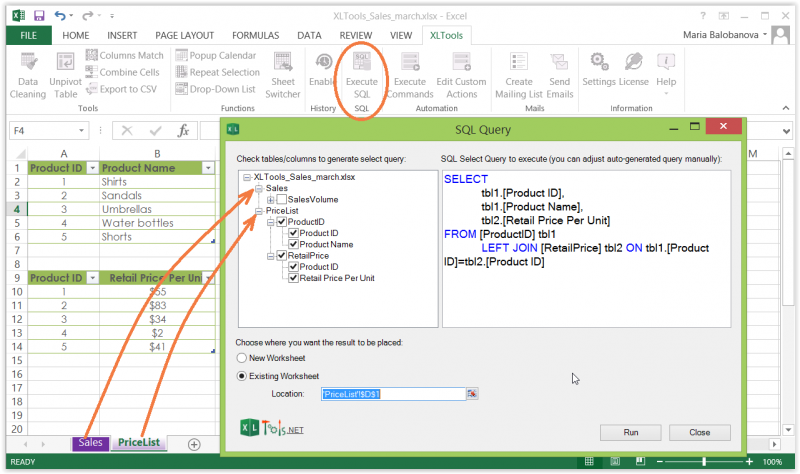
Screenshot: main features of XLTools SQL Queries
Often Excel tables gradually grow into large inconvenient workbooks. Finding duplicates, filtering, grouping, complex sorting, joining tables into one, etc. – become a real challenge. Potentially, these tasks could be easily executed with SQL… if only it were possible to run SQL queries against Excel data.
XLTools SQL Queries add-in enhances Excel with the power of structured query language:
  • Run SQL queries in Excel interface and directly on Excel tables
  • Generate SELECT and JOIN statements automatically
  • Use JOIN, ORDER BY, DISTINCT, GROUP BY, SUM and other SQLite operators
  • Write queries in the intuitive editor with syntax highlighting
  • Address any Excel tables from a tree list view

Before you begin, add SQL Queries to Excel

SQL Queries is one of the 20+ features within XLTools Add-in for Excel. Works in Excel 2019, 2016, 2013, 2010, desktop Office 365.

Get started with XLTools ribbon
– free trial gives you 14 days of full access to all features.

How to turn your Excel data into a relational database and prepare for SQL querying

By default, Excel presents data as simple data ranges. But SQL works only with relational data sources. So before you begin, make sure to format Excel ranges as tables (named ranges with table style applied):
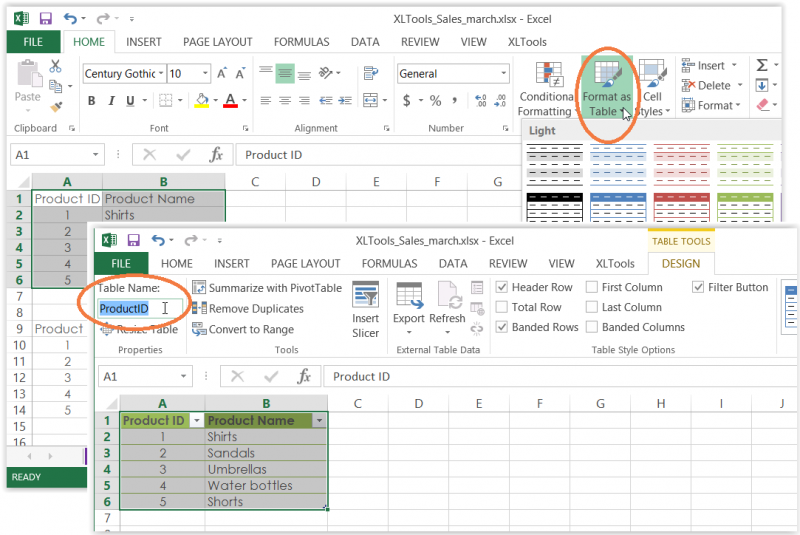
  1. Select the data range On the Home tab click Format as Table Select a table style.
  2. Select the table Open the Design tab Type in the Table Name.
    E.g. "ProductID"
  3. Repeat these steps for each data range that you plan to use in SQL queries.
    E.g. tables "RetailPrice", "SalesVolume", etc.
  4. Done, now these tables will serve as a relational database and are prepared for querying.
How to turn Excel data into relational database before running sql queries

How to create and run SQL SELECT on Excel tables

SQL Queries add-in allows you to execute queries on Excel tables located in different worksheets and different workbooks. Please make sure that these workbooks are open and the necessary data are formatted as named tables.
  1. Click the Execute SQL button on the XLTools tab The editor window will open.
  2. On the left-hand side find a tree view of all available tables.
    Click on the nodes to expand/collapse table fields (columns).
  3. Select entire tables or specific fields.
    As you tick the fields, SELECT statement is generated automatically in the right-hand side area of the editor.
    Tip:watch the SQL editor automatically highlight syntax.
  4. Choose whether to place the query output on a new or an existing worksheet.
  5. Click Run Done!
How to generate SELECT statement with XLTools SQL Queries

Operators Left Join, Order By, Group By, Distinct, and other SQLite commands in Excel

XLTools uses SQLite syntax. Users who are familiar with SQLite can execute a wide variety of queries:
  • LEFT JOIN – join two or more tables by shared key columns
  • ORDER BY – sort data in query results
  • DISTINCT – remove duplicates from the query output
  • GROUP BY – group data in query results
  • SUM, COUNT, MIN, MAX, AVG and other operators
Tip:watch the SQL editor automatically highlight syntax.

How to join two or more Excel tables with SQL Queries add-in

You can merge multiple Excel tables into one if they have a shared key field. Suppose you have to join a few tables that share a column "ProductID":
  1. Click Execute SQL on XLTools tab Select the fields you want to see in the merged table.
    As you tick the fields, SELECT and LEFT JOIN get generated automatically.
  2. Choose whether to place the query output on a new or an existing worksheet.
  3. Click Run Done! A merged table appears in seconds.
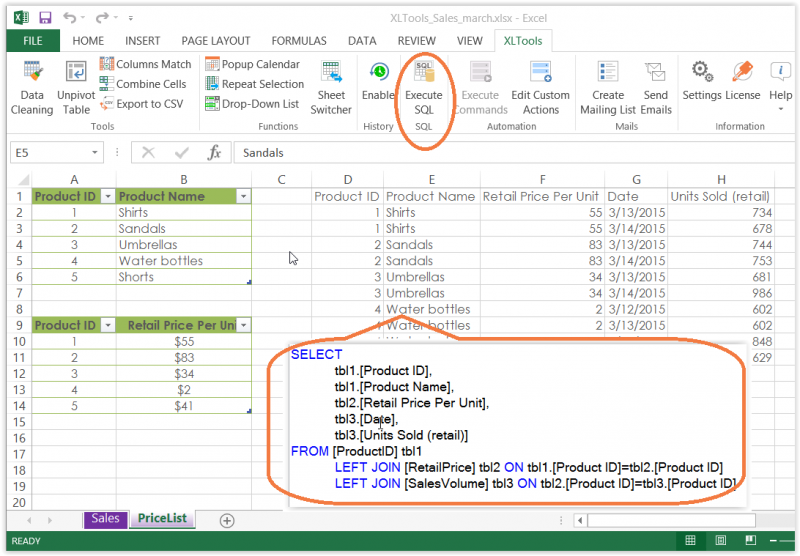
How to left join Excel tables with XLTools SQL Queries add-in
Any questions or suggestions?
DEWhat happen here?! No answers since 2022? To me - there is no support!
February 3, 2026 at 18:33
julianI want to know if addin can save data into a table (sql server) ?
May 3, 2023 at 09:39
JulianCan we get the result of the query in a recordset ?
May 3, 2023 at 09:39
JefHi there I want to create a SQL statement where for example one has two columns, the columns meaning are the same but different wording and then in the results column it must display, Match or Mismatch. SO the idea would be to use SQL to say column A should be "country", columb B Should be "CNTRY" indicate in Column C if this is a match or mismatch
May 3, 2023 at 09:39
ANTONIO BROWNROW_NUMBER NO WORKING :(
May 3, 2023 at 09:39
Tom BiceCan one include WHERE the SQL queries? If so, where is this described?
May 3, 2023 at 09:39
Waseem Asgharhow to give reference of cell in sql statement
May 3, 2023 at 09:39
ALWARANY SQL QUERY WE CAN GET
May 3, 2023 at 09:39
Thomas FungI installed the xltools in my pc , but the XLtools tab not exist in my Excel 365
March 13, 2026 at 09:23
Peter LiapinHi Thomas, if you are using desktop Excel on Windows, please try activating the add-in manually: Excel > File > Options > Add-Ins > Manage COM Add-Ins > Go > check XLTools Add-in for Microsoft Excel > OK. If that does not help, please also see our Troubleshooting page: Troubleshooting. If you are on Mac, please note that XLTools desktop is for Windows only.
March 13, 2026 at 10:49
Mor SagmonIs the resulting table "live"? meaning, linked to the data sources and automatically calculated upon changes to the source tables (like Excel calculates dependent cells automatically)?
May 3, 2023 at 09:39
DanaSQL Query confusion .... FREE .... Buy 19.95 ..... Free Trial or 6.99 month. Is there a difference between 19.95 version and the 6.99 per month version .... I am running Excel 2013 .... Price? — It's FREE! .. really misleading. Please advise ... Thank you, Dana Masters
May 3, 2023 at 09:39
John MillerIs there support for checking blank or null cells in the SQL Query tool?
May 3, 2023 at 09:39
Maria BalobanovaHi John, XLTools uses SQLite and it supports IS NULL and IS NOT NULL operators - you can use them your query.
May 3, 2023 at 09:39
SisirCan we use DATEDIFF functions here? I tried a couple of different combinations and doesn't seem to work. Appreciate your help.
May 3, 2023 at 09:39
Maria BalobanovaHi Sisir, our add-in is based on SQLite language. SQLite, however, does not support the DateDiff function. There are workarounds, e.g. subtracting one date from the other to get the difference.
May 3, 2023 at 09:39
Amy B SesslerCan Case statements be executed using this tool
May 3, 2023 at 09:39
Maria BalobanovaHi Amy, yes, this add-in uses SQLite syntax, and CASE expressions are supported as well.
May 3, 2023 at 09:39
Sayth RenshawNoticed when I saved file locally worked fine. When filed stored in Onedrive it fails to find the workbook.
May 3, 2023 at 09:39
Maria BalobanovaHi Sayth, Thank you for reporting this. We will definitely look into this issue!
May 3, 2023 at 09:39
Matt F

Certificate errors during install, would love to try.   Name: XLTools Add-In for Microsoft Excel From: https ://xltools.net/clickonce/pro/en/XLTools.vsto ************** Exception Text ************** System.Security.SecurityException: Customized functionality in this application will not work because the certificate used to sign the deployment manifest for XLTools Add-In for Microsoft Excel or its location is not trusted.

May 3, 2023 at 09:39
Maria Balobanova

Hello Matt, thank you for reporting the error! We will look into it.

In the meanwhile, please try this: download XLTools again > Save the file > Run ‘XLTools.exe’ and follow the setup wizard > If you are prompted to install Microsoft prerequisites along the way, please do so.

May 3, 2023 at 09:39
Marcio MollicaIs there a version of this add-in for Mac OS?
May 3, 2023 at 09:39
Maria BalobanovaNo, Marcio, XLTools desktop is for Windows only. You may be interested in our SQL Queries app - it has similar functionality and works in Excel for Mac. The app is available in Microsoft Office Store.
May 3, 2023 at 09:39
Baba AndhaleDear sir, I have downloaded XLTools and created a query as I need. But I have to save its name and have to run with macro. How it will be done, Pls guide
May 3, 2023 at 09:39
Maria BalobanovaHi Baba, Thank you for your interest in XLTools! You can copy the query text in the SQL Queries editor and use it in your macro, if that's what you mean. Or you can try our Automation feature to run SQL queries against Excel tables without VBA scripting.
May 3, 2023 at 09:39
Deepak R. RechwadHello sir, as we are sql programing developer, can we use your XLTools PRO for deployment to our client? direct generate their report in excel? pls guide me Thanks Deepak R. Rechwad (India, Mumbia)
May 3, 2023 at 09:39
Maria BalobanovaDear Deepak, Thank your for your interest in XLTools! You can create and run reports with XLTools SQL Queries for your customers. Please note, that if you plan to deploy XLTools at your customer's computers as well, they will also need the PRO license. Number of computers = Number of Licenses. Before buying the PRO license, I strongly advise that you take the free trial and see if XLTools SQL Queries will be suitable for the reports you want to develop. Once you download the XLTools add-in, you will automatically receive the free trial license to your email. Let me know if any questions.
May 3, 2023 at 09:39
TuomoWhat if anything does this tool have that Microsoft's free Power Query add-on doesn't?
May 3, 2023 at 09:39
Maria BalobanovaHi Tuomo, these are two different tools for different purposes. Microsoft Power Query add-in allows working with external data. SQL Queries by XLTools is the add-in that enables data analysis directly Excel. Basically, you can create and run queries directly against Excel tables using SQL language. You can have both add-ins on you computer.
May 3, 2023 at 09:39
JulianI assume this allows you to query worksheets in the SAME workbook? If so and I distribute that workbook to members of my team will the queries work if the members don't have SQL query add on installed?
May 3, 2023 at 09:39
Peter LiapinHello Julian, On this page we have information about our COM add-in which can not be embedded in a single workbook, so all your team members who need SQL Queries will need to install XLTools Add-In too. By the way it allows to run SQL query across multiple tables in a multiple workbooks if you open them all at the same time.
May 3, 2023 at 09:39
AlwarHi, I am alwar. I like XLTOOLS i.e., automation toolkit. But in automation toolkit only one example is given. It is very easy to understand. By seeing this example only I can develop. I want many example. So that only I can work by seeing that example. I tried for many example in youtube for XLtool. I cant find any XLtool example. So many example is give I though of purchasing it. My email id is : alwar1965@gmail.com Thanking you, BY Alwar
May 3, 2023 at 09:39
How can we help?